
Journaling Apps: What You Need to Know in 2026
There's something powerful about getting thoughts out of your head and onto a page. That tangled mess of worries, ideas, and half-formed plans suddenly becomes clearer when you can see it written down. Journaling isn't just a diary — it's a thinking tool, a stress valve, and a record of who you are becoming.
We evaluated 59 journaling apps across iOS and Android, scoring each on real user ratings, feature depth, and long-term value. This guide covers what we found.
The Science of Getting Thoughts Out of Your Head
In the late 1980s, psychologist James Pennebaker at the University of Texas at Austin asked a simple question: what happens when people write about their deepest emotional experiences? The answer, replicated across dozens of studies over three decades, was striking. Subjects who wrote about traumatic or emotionally charged events for just fifteen to twenty minutes a day, over three to four days, showed measurable improvements in physical health, immune function, and psychological well-being. They visited doctors less frequently. Their blood pressure dropped. They reported less anxiety and depression months later.
The mechanism isn't the writing itself — it's the organizing. Chaotic emotions, left to churn in your head, remain formless and overwhelming. The act of translating them into structured language forces cognitive processing. You have to find words for feelings. You have to sequence events into a narrative. You have to decide what matters and what doesn't. That process — not the finished text — is where the therapeutic value lives.
This distinction matters for choosing a journaling app because not all journaling serves the same purpose. Pennebaker's expressive writing protocol is designed for emotional processing — working through difficult experiences. Diary-keeping is archival, a record of events and observations. Gratitude journaling (following Robert Emmons's research) is specifically aimed at shifting attentional patterns toward positive experiences. Each produces different outcomes.
Digital journals add dimensions that paper can't match. Searchability means you can find patterns across months or years of entries. Privacy through encryption means you can be genuinely honest — critical for expressive writing to work. Cloud backup means your journal survives a lost phone. The technology doesn't change the psychology. But it removes friction that keeps many people from doing the writing in the first place.
Blank Page vs Prompted: What the Research Actually Says
The blank page is seductive in theory and paralyzing in practice. Staring at an empty screen, cursor blinking, most people write nothing — or write something safe and superficial that doesn't produce the cognitive processing that makes journaling worthwhile. This is the beginner's trap, and it's why prompted journaling exists.
The research draws useful distinctions. Free-writing excels at emotional processing. Pennebaker's protocol is essentially unstructured: write about your deepest thoughts and feelings. No prompts, no guardrails. The lack of structure is the point — it forces you to find your own way through the emotional material, which is where the processing happens. But this requires a degree of psychological readiness and writing comfort that many people don't have when they're starting out.
Prompted journaling is better for habit formation and structured self-reflection. Gratitude prompts (pioneered by Robert Emmons) focus your attention on specific positive experiences: 'What went well today? Who am I grateful for? What small moment did I appreciate?' The structure removes decision fatigue and ensures you actually write. Morning pages, Julia Cameron's technique from The Artist's Way, use sheer volume — three pages of longhand, stream-of-consciousness writing first thing in the morning — to bypass the inner critic through exhaustion rather than insight.
The practical takeaway: most people need prompts to start. Prompts lower the barrier to entry, build the daily habit, and ensure consistency. Over weeks or months, many journalers naturally graduate to free-writing as the habit becomes automatic and they develop confidence in their own voice. The blank page is an advanced tool, not a beginner one. Apps that offer both modes — with the ability to transition between them — serve the widest range of users.
Digital Privacy and the Trust Problem
Your journal is valuable precisely because it contains your most unfiltered thoughts. The entry where you admit you resent your business partner. The page where you process your marriage's rough patch. The paragraph where you acknowledge, for the first time, that you want to quit. This radical honesty is what makes journaling therapeutic — and it's exactly what makes privacy non-negotiable.
End-to-end encryption means the app's servers store your entries in a form that even the company cannot read. This is different from encryption at rest (which protects against external hackers but not the company itself) and different from transport encryption (which only protects data in transit). When evaluating a journaling app, the question isn't 'is it encrypted?' — it's 'who holds the keys?' If the company can decrypt your entries, your privacy depends on their policies, their employees' integrity, and their ability to resist legal requests or data breaches.
Local-first storage — where your data lives primarily on your device rather than in the cloud — provides a different kind of protection. If the company goes bankrupt or changes its terms, your journal stays on your phone. Some apps offer local-only modes with optional sync, giving you the convenience of cloud backup with the security of on-device storage.
The trust problem is real. Several journaling and wellness apps have been caught sharing aggregated user data with third parties, using entries to train AI models, or changing privacy policies retroactively. Before your first entry, read the privacy policy. Check whether the app has been audited. Look for whether they've taken a public position against using journal content for AI training. The best journaling apps are designed so they technically cannot read your content — and they consider that a feature, not a limitation.
4 Types of Journaling Apps — and How They Differ
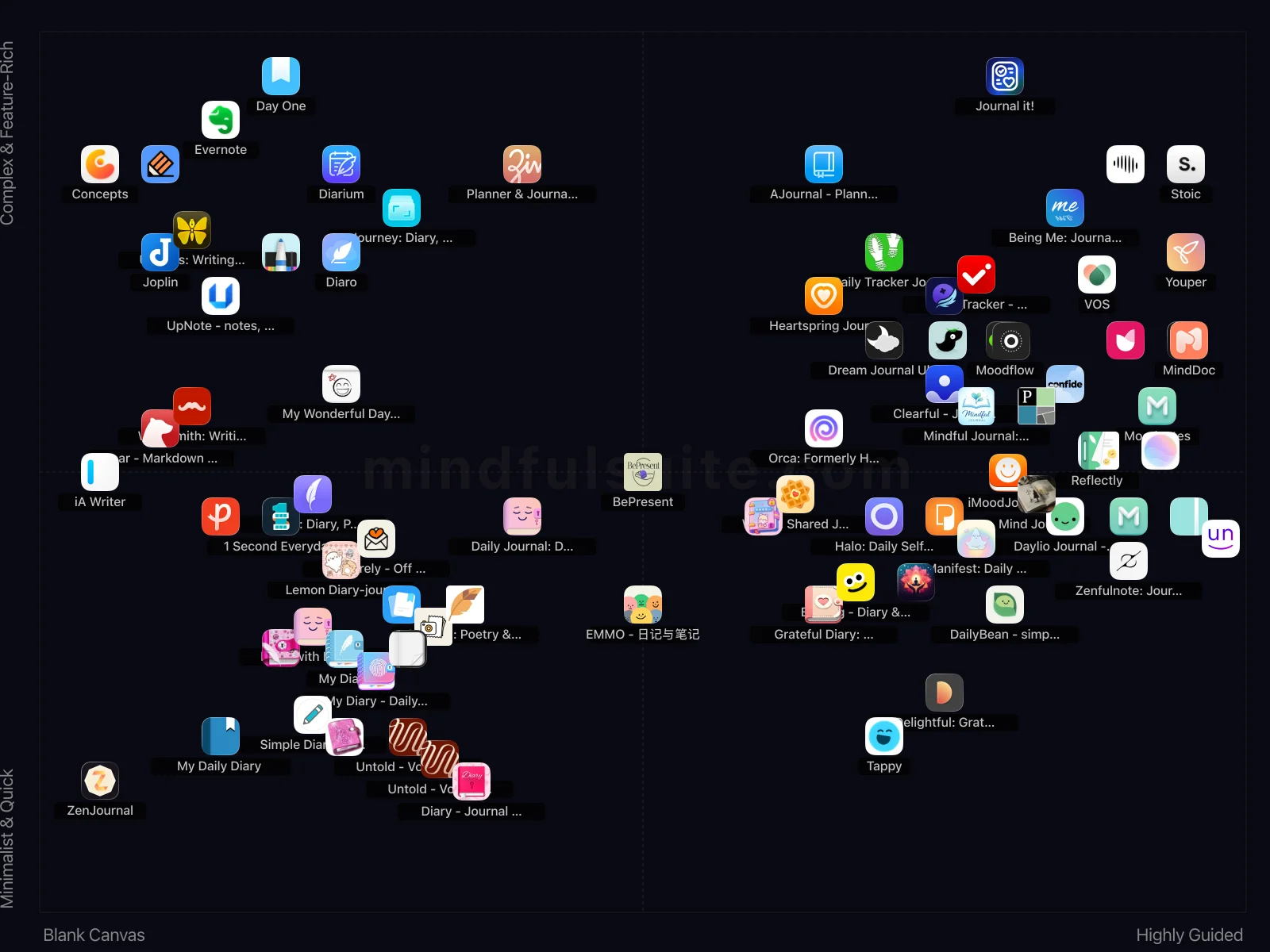
These 84 apps don't all solve the same problem. They cluster into 4 distinct groups, each built around a different philosophy. Understanding which group fits you is the fastest way to narrow your search.
Blank Canvas + Complex & Feature-Rich
18 apps in this group, led by  Concepts,
  Day One, and
  Diaro.
What defines this cluster: free with iap, sketching and design app, infinite canvas, digital scrapbook.
Diaro.
What defines this cluster: free with iap, sketching and design app, infinite canvas, digital scrapbook.
Highly Guided + Complex & Feature-Rich
34 apps in this group, led by  Reflectly,
  Stoic, and
  Moodnotes.
What defines this cluster: ai-powered journal, mood tracker, daily quotes, free (iap).
Moodnotes.
What defines this cluster: ai-powered journal, mood tracker, daily quotes, free (iap).
Blank Canvas + Minimalist & Quick
19 apps in this group, led by  1 Second Everyday: Video Diary,
  Daily Journal: Diary with lock, and
  Diary with Lock: Diary Journal.
What defines this cluster: record one second daily, create a video diary, smart fill feature, free with iap.
Diary with Lock: Diary Journal.
What defines this cluster: record one second daily, create a video diary, smart fill feature, free with iap.
Highly Guided + Minimalist & Quick
13 apps in this group, led by  Grateful Diary: Daily Journal,
  Daylio Journal - Mood Tracker, and
  EMMO - 日记与笔记.
What defines this cluster: daily diary, personal journal, keep memories safe, micro-diary.
EMMO - 日记与笔记.
What defines this cluster: daily diary, personal journal, keep memories safe, micro-diary.
What makes them different
The core tension in this category runs along two axes. On one side, Blank Canvas apps prioritize simplicity and speed — you can be up and running in under a minute. On the other, Highly Guided apps offer depth and customization that rewards investment over time.
The second axis — Scope — captures an equally important difference. Apps closer to Minimalist & Quick take a fundamentally different approach than those near Complex & Feature-Rich. Neither is objectively better. The right choice depends on your personality, your experience level, and what you're trying to accomplish.
59 Apps Reviewed
We scored every app using a weighted composite of real App Store and Google Play ratings. Out of 59 apps: 21 Essential · 34 Hidden Gems · 1 Mainstream. 31 cross-platform, 22 iOS-only, 6 Android-only.
Top picks: Day One and Diaro scored highest overall. Daylio Journal - Mood Tracker rounds out the top three. Switch to the Apps tab for the full list with ratings and download links.
How to Pick the Right One
Look at the cluster section above. If you already know whether you want Blank Canvas or Highly Guided, that eliminates half the options instantly. Same for Minimalist & Quick vs Complex & Feature-Rich.
Try one app for a full week before judging. Most journaling apps reveal their value around day 5, not day 1.
Quick start: Day One and Diaro represent two different approaches and both scored highest. Pick whichever resonates, switch if it doesn't click.
Making It Stick: Practical Advice
Downloading the app is the easy part. The hard part — the part that actually produces results — is what happens in weeks two, three, and beyond. These tips are drawn from behavioral research and from patterns we've observed across hundreds of thousands of user reviews. They're not revolutionary, but they work:
Write at the same time each day
Morning pages (writing first thing after waking) and evening reflection are the two most popular approaches. Pick one time and stick with it — the routine matters more than the content.
Don't worry about quality
A journal is not a novel. Grammar, spelling, and eloquence don't matter. What matters is getting honest thoughts out of your head. Write messily, write briefly, write angrily — just write.
Use prompts when you're stuck
Blank-page paralysis is real. Keep a few go-to prompts handy: 'What am I grateful for today?' 'What's on my mind right now?' 'What would I tell my best friend about today?'
Re-read past entries monthly
The real magic of journaling emerges when you look back. Monthly reviews reveal patterns you couldn't see in the moment and remind you how far you've come.
Frequently Asked Questions
These are the questions that come up most often — from our own testing, from user reviews, and from the broader conversation around journaling apps. If your question isn't here, the Apps tab has detailed information on every app we reviewed.
Is digital journaling as effective as paper journaling?
Research on expressive writing hasn't shown a significant difference between digital and handwritten journaling. The most important factor is consistency. If a phone app means you actually journal daily (versus a notebook gathering dust), digital is more effective for you.
How long should a journal entry be?
There's no minimum. Some of the most impactful entries are a single sentence capturing an important thought. Others are pages long. Start with 3-5 minutes of writing and let it grow naturally.
Should I use prompts or free-write?
Both approaches work. Prompts are excellent for building the habit and ensuring you cover different aspects of your life. Free-writing is better for processing specific emotions or events. Many people alternate between the two.
How do I keep my digital journal private?
Look for apps with end-to-end encryption, biometric lock (Face ID or fingerprint), and local storage options. Read the privacy policy to understand how your data is handled. Several apps in our review are designed specifically for maximum privacy.
The Best Journaling Apps to Capture Your Life (2026)
Remember that leather-bound diary with the tiny, easy-to-lose key? Or the stack of half-finished notebooks on your shelf? Journaling has always been a powerful way to process our thoughts, but keeping up with a physical book can feel like a chore. Brilliant ideas vanish, precious memories fade, and complex feelings get lost in the daily shuffle.
What if you could carry a secure, multimedia-rich, and infinitely organized journal right in your pocket? Digital journaling apps transform the classic practice of self-reflection. They are your personal archivists, your mood-tracking sidekicks, and your private spaces for untangling the beautiful chaos of life. Whether you want to write a novel or just tap an icon to say "today was good," there's a perfect digital companion waiting for you.
The All-Rounder Digital Diaries
These apps are the powerhouses of the journaling world. They offer beautiful designs, robust cross-device syncing, and flexible features to capture your life in rich detail.

Day One
Often hailed as the gold standard, Day One is more than a journal; it's a beautiful, award-winning space to build a digital scrapbook of your life. It effortlessly weaves together your words, photos, videos, and audio clips into a stunning personal timeline. It even automatically adds context like the weather and your location, turning simple entries into rich memories.
- Its rich-media integration, including videos and audio, creates a truly immersive and detailed personal archive.
- The beautiful, award-winning design makes the journaling experience genuinely enjoyable and visually appealing.

Diarium
Diarium is a feature-packed journal that stands out for its fantastic business model: a single one-time purchase unlocks all pro features forever. It integrates with your calendar, social media, and fitness trackers to automatically add context to your days, making it effortless to create a rich log of your life without a recurring subscription fee.
- Its robust feature set, including multimedia attachments and flexible organization, makes it highly versatile.
- The one-time purchase option is a refreshing alternative to subscriptions, offering full functionality permanently.

Journal it!
A powerful, all-in-one app for those who want their journal to do everything. It combines a diary, planner, habit tracker, and note-taker into one highly organized system.
- Its comprehensive feature set, including "habit tracking" and "mood monitoring," makes it a powerful all-in-one productivity and journaling tool.
- "Traditional diary entries" combined with notes offer excellent flexibility for diverse writing needs.

Journey: Diary, Journal
Journey is a digital diary and journal app. It encourages gratitude, health, and calmness through journaling.

Diaro
For the super-organizer, Diaro is a dream come true. This straightforward, multi-platform diary is built around powerful organizational tools. You can sort entries by folders and tags, making it incredibly easy to find exactly what you're looking for, whether it's work notes, travel memories, or daily thoughts.
- Excellent organization capabilities with folders, tags, and locations make finding specific entries incredibly easy.
- Its multi-platform support ensures your journal is accessible and synchronized across all your devices.

UpNote - notes, diary, journal
UpNote is a clean and simple app for writing and organizing notes, diaries, and journals. It is easy to use with rich features and a delightful experience.
- Its versatile design allows seamless integration of general notes and daily journaling within one organized system.
- The rich markdown support provides extensive formatting options for detailed entries and lists.

Notebook - Diary & Journal App
A digital diary and note-taking app that mimics a physical book with page-turning animations.
- The aesthetic of "turning the pages of a book" offers a unique, nostalgic, and visually pleasing journaling experience.
- Its elegant and "natural" design prioritizes the writing experience, making entries feel more personal.

Diarly: Diary, Private Journal
Diarly: Diary, Private Journal is a journaling app that offers a straightforward and appealing interface for writing daily entries. It's suitable for both new and experienced journalers.
- Diarly balances a clean, inviting interface with sufficient features, making daily journaling genuinely appealing.
- Password protection for entries offers essential peace of mind, ensuring your private thoughts remain secure.

My Wonderful Days Journal
A straightforward diary app that allows easy writing with analog features, iCloud support, and photo integration across iPhone and iPad.
- Robust iCloud sync and universal iPhone/iPad support make it a truly cross-device personal journal.
- Charming "analog features" like diverse fonts and themes offer a personalized, aesthetically pleasing writing experience.

Simple Diary - Daily Journal
Simple Diary is an easy-to-use journaling app with privacy lock features.
- Its straightforward interface truly prioritizes ease of use, making daily entries quick and frictionless.
- The integrated lock feature provides essential privacy, securing your thoughts without extra complexity.

My Diary
A simple, secure, and incredibly popular digital diary. With a strong focus on privacy and customization, it's a reliable place to store your private thoughts and memories.
- The fundamental "lock to protect your private thoughts" is a well-executed feature, ensuring crucial personal security.
- Its massive user base proves its reliability as a straightforward, dependable digital journal.

My Diary - Daily Diary Journal
An online diary journal with a lock feature for recording daily thoughts, moods, and private moments. It's for users who want a secure journal with pictures, videos, themes, and stickers.

Daily Journal: Diary with lock
A personal journal app with a lock feature, allowing users to write daily notes and track their moods securely.

Diary with Lock: Diary Journal
Diary with Lock: Diary Journal is a free journaling app with password protection using pattern lock, PIN, or fingerprint. It offers unlimited entry editing options, including pictures, emojis, and moods.
For Quick & Visual Journaling
Don't have time to write? We get it. These apps let you log your day in seconds using taps, icons, and emojis. They’re perfect for spotting mood patterns and habits without writing a single sentence.

Daylio Journal - Mood Tracker
Daylio is a massively popular micro-diary that brilliantly answers the question: "What if I could journal without typing?" You simply pick your mood and tap icons for the activities you did that day. Over time, it creates fascinating charts that reveal what habits and routines actually make you happy.
- Effortlessly track moods and activities with a quick tap-based interface, making daily logging consistent.
- Generates insightful statistics and charts to visualize mood patterns and activity correlations over time.

DailyBean - simplest journal
Imagine logging your day with adorable "mood beans." DailyBean is a simple and cute journaling app that makes self-reflection feel like a fun game. Like Daylio, it uses a visual system of moods and activity icons, giving you a delightful overview of your month at a glance.
- Its incredibly intuitive tap-based system makes logging mood and activities genuinely fast and effortless;
- The visual summary of daily emotions and activities is a clear differentiator in this category.

EMMO - 日记与笔记
Allows users to record their mood using hand-drawn expressions to capture feelings.
- The ability to draw your own mood expressions offers a unique and creative way to log feelings;
- The interactive and visually engaging interface makes daily mood tracking more enjoyable and personal.

Voidpet Garden: Mental Health
Voidpet Garden is a mental health journal where emotions live as magical creatures. It serves as a daily journal and mood tracker.
- The unique gamified approach, where emotions manifest as "magical creatures," makes journaling and mood tracking surprisingly engaging for younger users.
- It differentiates itself significantly in a crowded journaling space by adding a creative, interactive element to self-reflection.

Emolog - Diary & Mood Tracker
Helps users care for themselves and others by tracking moods with dynamic emojis.
- The "Dynamic Emojis" provide a unique, visually expressive way to track and understand nuanced emotional states.
- Its "Hidden Gem" status suggests a refreshingly different approach to mood tracking compared to generic options.

ZenJournal
Sometimes, the most important thing is just to get the thought out of your head and onto the page. ZenJournal is built for exactly that. It's a minimalist, lightning-fast journaling app perfect for scripting exercises or quick "brain dumps." Its beautiful simplicity removes all friction, letting you focus purely on the energy of your words.
- Its extremely minimalist interface prioritizes quick, distraction-free logging of thoughts and affirmations, ideal for micro-journaling.
- The focus on simplicity makes it incredibly lightweight and fast, perfect for capturing fleeting manifestation insights.

Moodflow
A mood and habit tracker that helps users understand their emotions and build positive routines. It is for individuals looking to track symptoms, moods, and habits to improve emotional awareness.
- Moodflow effectively combines mood tracking with habit formation, providing a holistic view of emotional well-being and routines.
- Its visual analytics and insights help users identify patterns between daily activities and emotional states.

Tappy
Tappy is designed for simplicity. It allows you to log your mood with a single tap, making it one of the fastest ways to keep a record of your emotional state throughout the day.
- Its core "single tap" logging mechanism makes mood tracking incredibly quick and unintrusive, encouraging consistent daily use.
- The clear visualization of mood patterns and triggers helps users genuinely understand daily emotional fluctuations without complex inputs.

iMoodJournal
Tracks mood with detailed insights into emotional influences. It's for anyone wanting to journal and understand their feelings.
- Provides "detailed mood tracking" with custom tags, allowing for granular insight into emotional influences.
- The visual "mood cloud" offers a quick, intuitive overview of your emotional patterns over time.

Card Diary
Card Diary is a lightweight journaling app that uses a pixel camera and retro-inspired gadgets. It blends photography with journaling, allowing you to snap photos and add messages to create pixel-style cards.
For Guided & Structured Reflection
If staring at a blank page gives you anxiety, these apps provide the scaffolding you need. Through thoughtful prompts, CBT exercises, and guided questions, they help you dig deeper and build a consistent journaling habit.

Stoic
Stoic is more than a diary; it's a mental health companion grounded in philosophy and psychology. It uses the principles of Stoicism and Cognitive Behavioral Therapy (CBT) to help you not only record your feelings but understand them. Through guided exercises, meditations, and thoughtful prompts, it coaches you toward a more resilient and productive mindset.
- Offers a unique, philosophical approach to mental well-being with its "stoicism-based journaling" prompts.
- The "AI journaling" feature provides personalized reflections, making the self-improvement process more engaging.

Unstuck: CBT Therapy Journal
A simple and effective CBT-based journaling app designed to help you understand and change the thought patterns that impact your mental well-being.
- Offers a practical, guided approach to applying CBT principles for tangible improvements in mental well-being.
- The clean interface effectively breaks down complex thought patterns into manageable, actionable steps.

Moodnotes
A mood tracking and journaling app, developed with psychologists, that helps you identify your "thinking traps"—the negative thought patterns that can affect your mood—using CBT principles.
- Moodnotes excels at helping users identify "thinking traps" through its structured journaling, promoting genuine cognitive restructuring.
- The intuitive interface for tracking moods and thoughts makes self-reflection a consistent and insightful practice.

MindDoc
MindDoc acts like a thoughtful interviewer, asking you questions about your day to create a detailed emotional log and generate insightful reports on your mental health.
- Offers robust mood tracking combined with clinically-validated CBT exercises, providing structured mental health support.
- Generates personalized insights and progress reports, helping users understand their emotional patterns effectively.

Clearful - Journal & Diary
A journaling app focused on personal growth and mental health, providing a secure space to explore thoughts and emotions.
- Its explicit focus on personal growth and mental health provides a structured framework for deeper self-reflection.
- Emphasizing secure and private journaling builds crucial trust for sensitive self-exploration and introspection.

Perspective, a mindful journal
Perspective is a mindful journaling app intended to provide a safe space for self-reflection. The app encourages users to be honest with themselves and to pause and allow their minds to catch up.
- Its dedicated "Mindful Moments" prompts genuinely facilitate deep, introspective self-reflection.
- The integrated mood tracker provides valuable visual insights into emotional patterns over time.

Orca: Formerly HappyFeed Diary
Happyfeed takes the classic "three good things" idea and gives it a delightful, visual spin. By encouraging you to add photos to each happy moment, it helps you create a vibrant, personal feed of memories that are a true joy to scroll through later.
- Integrating photo and video entries makes gratitude reflections vivid and more memorable than text alone.
- The optional sharing feature offers welcome flexibility for those who want community without being forced into it.

Delightful: Gratitude Journal
Delightful: Gratitude Journal provides a simple interface for recording three good things each day. It's for users who want an easy way to cultivate gratitude through journaling.
- The elegant, uncluttered interface makes daily gratitude entries feel effortlessly simple and inviting.
- Focusing strictly on "three good things" maintains clarity and prevents overcomplication for beginners.

Prompted Journal - Shadow Work
This private journal app uses daily prompts to foster self-reflection and personal growth through guided writing.
- The "Shadow Work" prompts offer a deep, structured approach to self-reflection beyond surface-level journaling.
- The app excels at maintaining privacy for sensitive entries, crucial for therapeutic journaling.

Halo: Daily Self Care Journal
A private, safe space for daily journaling, helping users declutter their minds and build a consistent writing habit.
- Offers flexible writing durations, making it easy to integrate journaling into any busy schedule.
- Strong emphasis on self-care through its curated prompts fosters genuine emotional well-being.

CBT Thought Diary: Depression
CBT Thought Diary uses cognitive behavioral therapy in a journal format to challenge negative thoughts. It is designed for self-help in managing depression and improving mental well-being.

Grateful Diary: Daily Journal
A digital diary and journal app for securely recording thoughts, emotions, and memories. It is suited for users wanting a private and meaningful journaling experience.

Mind journal: Diary, Mood trac
A CBT-guided diary app designed to provide immediate anxiety relief through journaling. It is for individuals seeking a structured approach to self-reflection and mental well-being.
The AI-Powered Companions
These next-generation journals use artificial intelligence to do more than just store your words. They analyze your entries, uncover hidden emotional patterns, and act as an interactive partner in your self-discovery.

Reflection.app
An AI-powered journal that not only guides your reflections but also helps you uncover insights from what you've written. It's designed to be your personal coach for self-discovery.
- Its "AI-powered guided reflections" genuinely help users dig deeper into thoughts, moving beyond simple entry logging.
- The ability to "uncover insights" from entries provides valuable, personalized self-awareness that manual journaling often misses.

Mindsera
An AI journaling app that acts like a microscope for your mind. It analyzes your writing to provide deep insights into your mindset, emotions, and even hidden cognitive biases.
- The "AI journaling" that "analyzes your writing" to reveal cognitive biases is truly innovative for deep self-reflection.
- Its focus on "CBT & Self-Care Diary" provides a unique therapeutic angle distinct from typical journaling apps.

Rosebud AI
Rosebud AI offers a beautiful twist on mental wellness by focusing on AI-powered journaling. It acts as your personal guide for self-reflection, giving you intelligent prompts and analyzing your entries to reveal patterns in your emotional world. It’s perfect for anyone who finds clarity through writing.
- Focuses squarely on daily self-care and habit formation, providing structured routines to build positive mental health practices.
- As a "Hidden Gem," it likely offers a fresh, innovative approach to self-care tracking, differentiating from crowded markets.

Reflectly
Billing itself as a personal mental health companion, Reflectly makes journaling feel like a conversation. This AI-powered app asks you questions about your day, helps you identify thought patterns, and provides personalized insights to help you understand yourself better. It’s like having a friendly, insightful robot in your pocket.
- The AI-powered prompts genuinely encourage deeper self-reflection, helping users process thoughts that might otherwise disrupt sleep.
- Journaling before bed is a proven method for mental decluttering, which Reflectly facilitates expertly.

Youper
Youper is an AI assistant that feels like a wise, compassionate friend, using techniques from Cognitive Behavioral Therapy (CBT) to help you understand your thoughts and feelings.
- Its AI-powered chatbot offers instant, accessible CBT-based support for emotional health management.
- The high volume of Android ratings indicates a widely adopted and generally well-received platform.

Confide - Video Journal
A video journal that uses AI to analyze entries and turn them into conversations with a personalized AI companion.
- The AI "bestie" offers a unique, interactive conversational journaling experience, providing personalized feedback.
- Video journaling can be more expressive and cathartic than text-based entries for emotional processing.

Heartspring Journal
This journaling app helps you understand your emotions by analyzing the text or video you record.
- The innovative feature of analyzing "emotions hidden in your words" (and video) provides profound, personalized self-awareness.
- Its commitment to "No mood grids" ensures a more organic, free-form emotional exploration experience.

VOS
VOS helps users find a balanced life through a mental health app and wellbeing plan. The app is aimed at wellbeing, and tracks ADHD and mood.
Specialty & Niche Journals
Looking for something highly specific? From shared couples' diaries and dream analyzers to handwriting-focused apps and secure vaults, these journals excel at one distinct purpose.

Waffle: Shared Journal
A shared journal for couples, families, or friends to connect and get to know each other better.
- Its core shared journaling mechanic is perfect for couples or families wanting to connect meaningfully.
- Prompts specifically designed for collaborative reflection foster deeper understanding and shared experiences.

Dream Journal Ultimate
If you're fascinated by your nightly adventures, this is the app for you. Dream Journal Ultimate is a specialized tool for recording, analyzing, and even influencing your dreams. It features AI-powered interpretation to help you decode symbols and a "Dream Wall" where you can share and read dreams with a global community.
- The AI-powered dream interpretation offers genuinely unique insights, helping users understand their subconscious mind.
- The "social dream wall" provides a fascinating community aspect, allowing sharing and discussion of dream experiences.

Oniri - Your Dream Journal
A comprehensive dream journal with analysis tools for interpreting dreams and inducing lucid dreaming.
- Offers comprehensive tools for meticulous dream journaling, analysis, and inducing lucid dreams, catering to a niche psychological interest.
- Its detailed dream interpretation features provide unique insights into subconscious patterns and personal symbolism.

1 Second Everyday: Video Diary
Captures one-second videos daily and combines them into a movie, allowing users to create a time capsule of their life with features like Smart Fill.
- Uniquely creates a compelling video timeline of your life, offering a distinct daily check-in perspective;
- The "Smart Fill" feature genuinely simplifies compiling daily video memories from your camera roll.

Untold - Voice Journal
This journaling app focuses on telling the user's story in an encrypted space. It is a secure, personalized journal.
- The completely free model, combined with its unique focus on "telling your story" through voice, offers accessible personal reflection.
- Voice journaling allows for unfiltered expression, capturing nuances text journaling often misses.

Penzu
If privacy is your absolute top priority, think of Penzu as a digital fortress for your thoughts. It’s built from the ground up with security in mind, offering multiple layers of password protection and military-grade encryption to ensure your private reflections stay that way.
- Its strong emphasis on password-protected entries provides a genuine sense of privacy and security for personal thoughts.
- The simple, uncluttered interface focuses purely on writing, minimizing distractions for serious journaling.

Sincerely - Off My Chest
Sincerely is a platform for anonymous story sharing, connecting users who seek support.
- Sincerely provides a truly anonymous platform for sharing personal stories and connecting with a supportive community.
- Reading others' experiences can foster a sense of belonging and reduce feelings of isolation.

iA Writer
Provides a distraction-free writing environment for journaling and note-taking. Offers a clean interface to help focus on writing.
- Its signature Focus Mode truly eliminates distractions, perfect for uninterrupted daily reflection;
- The clean, minimalist interface prioritizes writing content above all else, fostering clarity.

Penbook
Penbook is a digital notebook app for handwritten notes using Apple Pencil. The app features "Live Paper" technology for a natural writing experience.
- Its "Live Paper" feature and Apple Pencil integration create an exceptional handwritten journaling experience, mimicking real paper.
- The vast array of paper types and templates allows for highly personalized and visually appealing notebook creation.

AJournal - Planner & Journal
Combines digital planning with handwriting, enabling users to plan, set goals, and journal using an Apple Pencil.
- The integration of Apple Pencil for handwriting offers a unique, mindful journaling experience, differentiating it from purely digital planners.
- Its "all-in-one planner" approach effectively centralizes daily schedules, long-term goals, and personal reflections into one cohesive space.

Planner & Journal - Zinnia
Zinnia is a digital journal and planner app with calendars, trackers, and stickers, and offers new content monthly.
- Creative freedom with stickers and custom layouts makes planning engaging and less tedious for ADHD users.
- Monthly new content provides fresh inspiration, actively preventing boredom often associated with routine planning.

Lemon Diary-journaling app
This app is a digital diary that allows users to record daily life events and decorate entries with stickers.
- Its "exquisite stickers" and multimedia support allow for creative, visually engaging journal entries.
- Offers strong organizational tools with searchable tags and categories for easy recall.

Zenfulnote: Journal & Heal
Serves as the official shadow work journaling app, guiding users through self-discovery. Based on the book, it helps users find their true self.
- As the "official shadow work journaling app," it provides structured, guided prompts directly from a bestselling author.
- Its specific focus on "shadow work" offers a unique, therapeutic niche within guided journaling.

Manifestation Journal
A law of attraction journal app to help users turn their dreams into reality.