
Sleep Tracker Apps: What You Need to Know in 2026
You slept 8 hours but feel exhausted. Or you slept 6 hours and feel surprisingly sharp. Duration alone doesn't explain sleep quality — timing, stages, disturbances, and pre-sleep behavior all play critical roles. Sleep tracker apps illuminate what happens between the moment you close your eyes and when your alarm goes off.
We evaluated 11 sleep tracker apps across iOS and Android, scoring each on real user ratings, feature depth, and long-term value. This guide covers what we found.
What Actually Determines Sleep Quality
Most people think about sleep the way they think about a bank account: it is all about the number. Eight hours good, six hours bad. But sleep researchers would tell you that someone who sleeps six hours of high-quality, well-structured sleep often wakes up feeling sharper than someone who spent nine hours in bed tossing through fragmented, shallow rest. Duration is the metric everyone tracks. It is also the least interesting one.
Sleep quality is determined by your sleep architecture — the progression through distinct stages across the night. A healthy night cycles roughly every 90 minutes through light sleep (stages N1 and N2), deep sleep (N3, also called slow-wave sleep), and REM sleep. Each stage serves different biological functions. Deep sleep is when your body repairs tissue, consolidates declarative memory, and releases growth hormone. REM sleep is when your brain processes emotions, consolidates procedural memory, and — yes — generates dreams. Disrupt the ratio and you wake up feeling unrested even after a full eight hours.
Then there is sleep efficiency: the percentage of time in bed that you actually spend sleeping. If you lie in bed for eight hours but spend 90 minutes awake — scrolling your phone before finally drifting off, waking at 3 AM with a racing mind, lying awake before your alarm — your sleep efficiency is only about 81 percent. Sleep medicine considers anything above 85 percent to be good.
Sleep latency — how long it takes you to fall asleep — is another signal most people ignore. Falling asleep in under 15 minutes is normal. Consistently falling asleep in under 5 minutes is not the badge of honor people think it is; it usually indicates significant sleep deprivation. Consistently taking more than 30 minutes suggests a problem worth investigating.
Wake-after-sleep-onset, or WASO, measures how much time you spend awake after initially falling asleep. Brief awakenings are normal and usually unremembered. Prolonged awakenings — lying awake for 20 or 30 minutes in the middle of the night — fragment your sleep architecture and reduce the time spent in restorative deep and REM stages. Sleep tracker apps are at their most useful when you stop fixating on the total hours number and start paying attention to these other dimensions.
Phone Sensors vs Wearables: The Accuracy Question
The gold standard for sleep measurement is polysomnography — a clinical sleep study where electrodes are attached to your scalp, face, chest, and legs, measuring brain waves, eye movements, muscle activity, heart rhythm, and breathing. It is extremely accurate. It also requires sleeping in a lab with wires glued to your head, which is to say: it tells you what your sleep looks like when you are sleeping in the worst possible conditions.
Consumer sleep tracking sits at the other end of the spectrum. Phone-based trackers use your device's accelerometer to detect movement in bed, sometimes supplemented by the microphone for snoring and ambient noise detection. The logic is simple: when you are in deep sleep, you move less. When you are in light sleep or awake, you move more. This gives a reasonable approximation of sleep duration and a rough estimate of restlessness, but it cannot reliably distinguish between sleep stages. A phone on your nightstand detects gross movement. It cannot detect the subtle physiological shifts that differentiate light sleep from deep sleep from REM.
Wearable trackers — smartwatches and rings — add optical heart rate sensing to the equation. Heart rate variability patterns differ across sleep stages: heart rate is more variable during REM sleep and more stable during deep sleep. This additional data stream allows wearables to estimate sleep stages with meaningfully better accuracy than phone-only tracking, though still far below clinical polysomnography.
Here is the honest assessment. Phone-based sleep tracking is good enough for identifying trends: are you sleeping more or less this week than last? Is your bedtime consistent? Do certain habits (late caffeine, alcohol, exercise timing) correlate with worse nights? For these questions, the accuracy is sufficient. Wearables improve the picture, especially for sleep stage estimation. But neither consumer device should be used for clinical diagnosis. If you suspect a sleep disorder — sleep apnea, restless leg syndrome, narcolepsy — see a sleep specialist. An app cannot and should not replace that evaluation. What apps can do, reliably, is help you see patterns that were previously invisible and make incremental improvements to your sleep habits based on your own data.
Understanding Sleep Scores (and When to Ignore Them)
Every sleep tracking app gives you a score. An 82. A 91. A discouraging 64 after the night your neighbor threw a party. These scores feel authoritative — a definitive judgment on how well you slept. They are not. They are proprietary calculations that vary dramatically from app to app, and understanding their limitations is essential to using them well.
Here is the problem: there is no standardized formula for a sleep score. Each app weighs the inputs differently. One might emphasize total duration heavily, another might weight sleep efficiency more, and a third might factor in heart rate variability if you are wearing a compatible device. An 85 in Apple Health, an 85 in Sleep Cycle, and an 85 in AutoSleep could reflect meaningfully different nights of sleep. They are not comparable numbers. Treating them as equivalent would be like comparing Fahrenheit to Celsius because both say "72."
The useful way to think about sleep scores is as a relative measure within a single app over time. Your personal average in one app is meaningful. Week-over-week trends are meaningful. Comparing last month's average to this month's after you changed your caffeine cutoff time — that is exactly the kind of insight these scores were designed to surface. The absolute number on any given night is the least useful piece of information the app provides.
There is also a real clinical concern called orthosomnia — a term coined by sleep researchers to describe anxiety caused by obsessing over sleep data. The irony is acute: a tool designed to help you sleep better can, for some users, become a source of nighttime anxiety that makes sleep worse. If you find yourself lying in bed worrying about what your sleep score will be, or feeling anxious after seeing a low number, you have crossed from useful tracking into counterproductive surveillance of your own body.
The sleep score is a compass, not a GPS coordinate. It points you in a general direction. It tells you whether things are getting better or worse. It does not tell you with precision where you are, and it certainly should not be the last thing you stress about before closing your eyes.
4 Types of Sleep Tracker Apps — and How They Differ
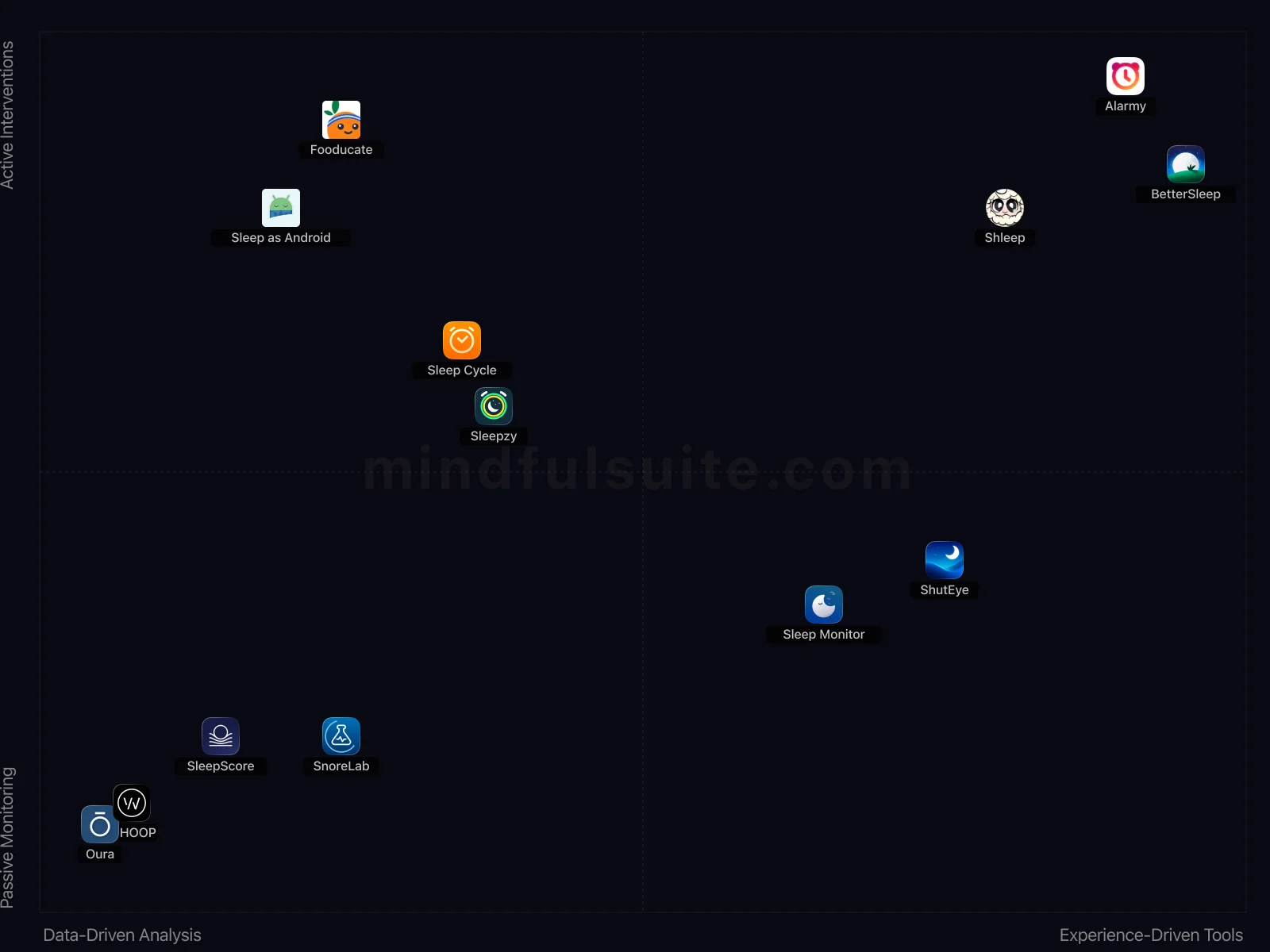
These 13 apps don't all solve the same problem. They cluster into 4 distinct groups, each built around a different philosophy. Understanding which group fits you is the fastest way to narrow your search.
Data-Driven Analysis + Active Interventions
4 apps in this group, led by  Sleep Cycle,
  Fooducate, and
  Sleep as Android.
What defines this cluster: sleep cycle tracking, analyzes sleep patterns, light sleep phase alarm, snore recorder.
Sleep as Android.
What defines this cluster: sleep cycle tracking, analyzes sleep patterns, light sleep phase alarm, snore recorder.
Experience-Driven Tools + Active Interventions
3 apps in this group, led by  Alarmy,
  BetterSleep, and
  Shleep.
What defines this cluster: alarm clock with missions, for heavy sleepers, sleep tracker, vast library of sleep sounds.
Shleep.
What defines this cluster: alarm clock with missions, for heavy sleepers, sleep tracker, vast library of sleep sounds.
Data-Driven Analysis + Passive Monitoring
4 apps in this group, led by  Oura,
Oura,  WHOOP, and
  SnoreLab.
What defines this cluster: sophisticated sleep analysis, tracks body temperature, tracks heart rate variability, provides three simple scores.
SnoreLab.
What defines this cluster: sophisticated sleep analysis, tracks body temperature, tracks heart rate variability, provides three simple scores.
Experience-Driven Tools + Passive Monitoring
2 apps in this group, led by  ShutEye and
  Sleep Monitor.
What defines this cluster: free (iap), sleep tracker, sleep analysis, snore recorder.
Sleep Monitor.
What defines this cluster: free (iap), sleep tracker, sleep analysis, snore recorder.
What makes them different
The core tension in this category runs along two axes. On one side, Data-Driven Analysis apps prioritize simplicity and speed — you can be up and running in under a minute. On the other, Experience-Driven Tools apps offer depth and customization that rewards investment over time.
The second axis — User Engagement — captures an equally important difference. Apps closer to Passive Monitoring take a fundamentally different approach than those near Active Interventions. Neither is objectively better. The right choice depends on your personality, your experience level, and what you're trying to accomplish.
11 Apps Reviewed
We scored every app using a weighted composite of real App Store and Google Play ratings. Out of 11 apps: 9 Essential · 1 Mainstream. 9 cross-platform, 1 iOS-only, 1 Android-only.
Top picks: ShutEye and Sleep Cycle scored highest overall. Sleep Monitor rounds out the top three. Switch to the Apps tab for the full list with ratings and download links.
How to Pick the Right One
Look at the cluster section above. If you already know whether you want Data-Driven Analysis or Experience-Driven Tools, that eliminates half the options instantly. Same for Passive Monitoring vs Active Interventions.
Try one app for a full week before judging. Most sleep tracker apps reveal their value around day 5, not day 1.
Quick start: ShutEye and Sleep Cycle represent two different approaches and both scored highest. Pick whichever resonates, switch if it doesn't click.
Making It Stick: Practical Advice
Downloading the app is the easy part. The hard part — the part that actually produces results — is what happens in weeks two, three, and beyond. These tips are drawn from behavioral research and from patterns we've observed across hundreds of thousands of user reviews. They're not revolutionary, but they work:
Be consistent with your sleep schedule
Go to bed and wake up at the same time every day — including weekends. This is the single most impactful thing you can do for sleep quality, and tracking makes the inconsistencies visible.
Focus on trends, not individual nights
One bad night of sleep data isn't meaningful. Look at your weekly and monthly averages to understand your true sleep patterns.
Use the data to experiment
Try changing one variable at a time (caffeine cutoff time, screen time before bed, room temperature) and watch how your sleep data responds. Your tracker turns sleep improvement from guesswork into empirical testing.
Frequently Asked Questions
These are the questions that come up most often — from our own testing, from user reviews, and from the broader conversation around sleep tracker apps. If your question isn't here, the Apps tab has detailed information on every app we reviewed.
How accurate are phone-based sleep trackers?
Phone sensors (accelerometer, microphone) provide reasonable estimates of sleep duration and general restlessness. They're less accurate than medical sleep studies or dedicated wearables for sleep stage detection. But for understanding patterns and making improvements, they're more than adequate.
Will sleep tracking make me anxious about sleep?
For some people, excessive focus on sleep data can cause 'orthosomnia' — anxiety about getting perfect sleep. If you find yourself stressing about your sleep score, try reviewing data weekly instead of daily, and remember that tracking is a tool, not a judgement.
Do I need a wearable for accurate sleep tracking?
Not necessarily. Phone-based trackers work well for most people. Wearables (smartwatches, rings) add heart rate and body temperature data for more accurate sleep stage estimation. If basic insights are enough for you, a phone app alone is fine.
Your Guide to the Best Sleep Tracker Apps for a Truly Restful Night (2026)
Remember trying to solve the mystery of a bad night's sleep? You'd lie there counting sheep, staring at the ceiling, or just accepting that some mornings you’d wake up feeling like you’d run a marathon. The world of sleep used to be a total black box, unfolding entirely in the dark while you were unconscious.
Now, the phone on your nightstand or the ring on your finger can be a powerful guide, illuminating what really happens after you close your eyes. These apps are more than just digital alarm clocks. They are sleep detectives, patient meditation guides, and personal data scientists. They can help you understand your sleep cycles, calm a racing mind, and gently nudge you awake at the exact right moment. Let's explore the best digital companions to help you reclaim your nights and greet the morning without groaning.
All-in-One Sleep Trackers
These apps are the Swiss Army knives of the sleep world. They aim to be your complete bedside solution, combining smart alarms with detailed sleep analysis and audio recording.

ShutEye
ShutEye is the swiss army knife for your slumber. It's a comprehensive tracker that listens for snoring or teeth grinding, a sound machine with a library of relaxing audio, and a smart alarm to top it all off. It aims to give you a complete picture of your night, from the moment you drift off to the moment you wake.
- Its "Smart Cycle Alarm" wakes you gently within your lightest sleep phase for a better morning experience.
- The app provides detailed sleep reports, including snore and sleep talk recordings, for deep insights.

Sleep Cycle
Sleep Cycle is an intelligent alarm clock that analyzes your sleep patterns. It uses your phone's microphone or accelerometer to monitor your sleep phases and wakes you during your lightest sleep phase, helping you feel rested and refreshed instead of groggy.
- Its smart alarm wakes you during your lightest sleep phase, leading to a much gentler morning experience.
- The integrated snore recorder and sleep talk analysis are surprisingly accurate and insightful.

Sleep Monitor
Sleep Monitor is a straightforward and reliable choice for anyone wanting to track their sleep cycles, hear what they sound like at night, and drift off to calming music. It provides easy-to-read graphs and reports, making it simple to spot patterns in your sleep habits.
- Automatically records snoring and sleep talking, offering insightful audio playback of your nocturnal habits.
- Provides basic sleep cycle analysis and sleep quality scores without requiring a premium subscription immediately.

Sleepzy
Sleepzy is a clean and friendly sleep tracker that delivers on its core promises: analyzing your sleep and waking you up at the best possible time. It also tracks your "sleep debt"—the running total of hours you've missed—and sends you nightly stats to keep you on track.
- The "Smart Alarm" feature aims to wake you during light sleep, theoretically making mornings less jarring.
- Its built-in snore recorder and analysis offer clear insights into nocturnal disturbances for users.

Sleep as Android
A legendary powerhouse in the Android world, this app is for the user who loves to tinker. It’s packed with features, from sleep cycle tracking and smart alarms to lucid dreaming cues and anti-snoring sounds. It connects with almost every wearable imaginable, giving you ultimate control over your sleep tracking experience.
- Offers extensive customization for its smart alarm, including CAPTCHA solving to prevent oversleeping.
- Integrates with various wearables and smart lights, creating a comprehensive smart sleep ecosystem.

SleepScore
Forget wearables or even putting your phone on the bed. SleepScore uses some seriously cool sonar technology to track your breathing and movement from your nightstand. Each morning, it gives you a simple "Sleep Score" out of 100 and offers science-backed advice to help you improve it.
- Utilizes unique sonar technology for contactless sleep tracking, avoiding the need for wearables or phone placement.
- Provides personalized recommendations based on your sleep data to genuinely improve sleep habits.
Wearable-Powered & Data-Heavy Apps
For the data nerds who want to know exactly what their heart rate, body temperature, and recovery metrics are doing at 3 AM. These apps pair with dedicated wearables to give you the most accurate and in-depth look at your physiological health.

WHOOP
WHOOP is a favorite among athletes and anyone obsessed with optimizing their performance. The sleek WHOOP band tracks your body's strain, recovery, and sleep 24/7. The app then provides incredibly detailed analytics and coaching, helping you understand exactly how your lifestyle choices impact your sleep and how your sleep impacts your ability to perform the next day.
- Provides exceptionally granular data on sleep stages, recovery, and strain, offering deep physiological insights for athletes.
- The "Sleep Coach" feature gives specific bedtime recommendations to optimize recovery based on daily activity and goals.

Oura
The Oura app is the brain behind the elegant Oura Ring. This combination provides one of the most sophisticated sleep analyses available. It tracks everything from body temperature to heart rate variability, then distills it all into three simple scores: Sleep, Activity, and Readiness. It tells you not just how you slept, but how ready you are to take on the day.
- Provides incredibly accurate sleep stage tracking, heart rate variability, and body temperature data via the Oura Ring.
- The "Restorative Time" metric uniquely highlights periods of deep physiological recovery each night.
Meditation & Sleep Aids
If a racing mind is the main villain keeping you awake, tracking your bad sleep won't fix it. These apps focus entirely on calming your nervous system with customizable soundscapes, stories, and guided exercises.

BetterSleep
While it contains meditations, BetterSleep is, first and foremost, the ultimate sleep toolkit. It’s a paradise of sound, famous for its enormous library of high-quality sleep sounds and a magical mixer that lets you craft your own perfect ambient soundscape.
- Boasts an enormous library of ambient sounds, guided meditations, and sleep stories, ensuring diverse content.
- Allows users to mix multiple sounds and save their custom soundscapes, providing great personalization.
Specialized Sleep Tools
Sometimes you don't need a comprehensive daily sleep score—you just need to solve one very specific problem. Whether you need a heavy dose of tough love to stop hitting snooze or a dedicated tool to track your nocturnal breathing, these apps do one job incredibly well.

Alarmy
For anyone who loses the battle with the snooze button every morning, Alarmy is the solution. It's the "evil" alarm clock that forces you to complete a "mission" to turn it off. Missions include solving math problems, shaking your phone vigorously, or even taking a picture of your coffee machine. It's tough love for your morning routine.
- Its "missions" like photo, math, or shake challenges genuinely force you awake, preventing snooze button abuse.
- Offers a unique "Wake Up Check" feature to ensure you don't fall back asleep after dismissing the alarm.

SnoreLab
If snoring is the main villain in your sleep story (or your partner's), SnoreLab is the hero you need. This app is a dedicated snore detective. It records and measures the intensity of your snoring, giving you a "Snore Score" so you can track what makes it better or worse, from lifestyle changes to different remedies.
- Precisely identifies and records snoring events, providing an insightful "Snore Score" for objective improvement.
- The app offers specific remedies and tracks their effectiveness against your individual snoring patterns.