
Day Counter Apps: What You Need to Know in 2026
Some numbers carry weight: 100 days sober. 30 days without smoking. 14 days until your wedding. Day counters attach meaning to the passage of time, turning abstract duration into a visible, growing number that represents your commitment, progress, or anticipation.
We evaluated 24 day counter apps across iOS and Android, scoring each on real user ratings, feature depth, and long-term value. This guide covers what we found.
The Psychology of a Growing Number
A day counter is among the simplest possible applications — it performs elementary arithmetic, adding one to yesterday's total. Yet that growing number carries psychological weight far out of proportion to its technical simplicity. Understanding why requires a tour through several well-documented cognitive biases that day counters exploit, deliberately or not, for the user's benefit.
Loss aversion is the primary mechanism. Daniel Kahneman and Amos Tversky's prospect theory, one of the most replicated findings in behavioral economics, demonstrates that the pain of losing something is roughly twice as intense as the pleasure of gaining something of equivalent value. Applied to a day counter: the pain of resetting a 60-day streak is felt far more acutely than the satisfaction of reaching day 60 in the first place. The higher the number climbs, the more psychologically costly it becomes to break it. This is sunk cost as a positive force — one of the rare contexts where this normally irrational bias works in your favor.
The endowment effect amplifies this. People value things they own more than identical things they do not own. Your streak is something you built, day by day, through accumulated effort. It is yours. The number 47 on someone else's counter is just a number. The number 47 on your counter represents 47 mornings of choosing correctly, 47 evenings of holding the line. You are not just tracking a number — you are building an asset, and the brain treats it accordingly.
For sobriety specifically, the day count takes on an additional dimension that purely behavioral streaks do not share. The number becomes an identity marker. There is a qualitative difference between saying "I stopped drinking" and saying "I am 90 days sober." The first is a description of a decision. The second is a description of a sustained achievement — an identity claim that carries weight, both to the speaker and to anyone who hears it. In recovery communities, day counts function as credentials. They communicate commitment, struggle survived, and progress earned. This social dimension — the day count as identity — is one reason sobriety counters often persist as a daily practice for years or decades, long after the initial behavioral change has stabilized.
Sobriety, Streaks, and Milestones: Different Counters, Different Stakes
Not all day counts are created equal, and apps that treat them as interchangeable miss something fundamental about their users' lives.
A sobriety counter is, for some users, a life-or-death instrument. Each day on that counter represents a day of choosing survival over relapse. The emotional weight of the number is enormous — a fact that has design implications most general-purpose counter apps fail to appreciate. A person tracking 120 days of sobriety does not experience their counter the same way someone tracking 120 days of a reading streak does. The consequences of resetting are incomparable. One is a mild disappointment. The other can trigger a shame spiral with potentially dangerous consequences.
This spectrum of stakes demands different features. Privacy is the most obvious. A sobriety counter on someone's home screen is a deeply personal piece of information. Many people in recovery have not disclosed their struggle to everyone in their life. A counter that is visible when a coworker glances at their phone, or that appears in a notification that might be read over their shoulder, represents a genuine privacy violation. The best day counter apps offer biometric locks on individual counters, the ability to disguise counter labels, and notification settings that are vague enough to maintain confidentiality.
Milestone celebrations serve different purposes at different stakes levels. For a fitness streak, a milestone at 30 days is a nice motivational nudge. For sobriety, 30 days is a significant achievement that recovery communities formally recognize. The structure of milestones — 24 hours, 1 week, 30 days, 60 days, 90 days, 6 months, 1 year — mirrors the milestone structure used by Alcoholics Anonymous and other recovery programs. These are not arbitrary numbers. They represent psychologically meaningful thresholds that the real world does not always provide structured recognition for.
For people using counters at the lighter end of the spectrum — tracking a meditation streak, counting days since their last cigarette, monitoring consecutive days of exercise — milestones provide motivational structure that prevents the long middle stretch from feeling endless. Day 7 is exciting. Day 100 is exciting. Day 43 is not inherently exciting, but knowing that day 60 is coming up gives day 43 a purpose.
The best day counter apps respect this spectrum. They do not assume every counter carries the same weight, and they provide the features — privacy, customizable milestones, community connection for those who want it, solitude for those who do not — that match the seriousness of the commitment being tracked.
When the Counter Resets (and Why That's Not Failure)
The most psychologically dangerous moment in any day-counting practice is the reset. The number goes back to zero. The streak you built — the thing you invested days or weeks or months in constructing — vanishes. And in that moment, the cognitive biases that were working for you reverse direction. The same loss aversion that made you fight to preserve a 45-day streak now tells you that you have lost everything. The same endowment effect that made the streak feel valuable now makes its absence feel devastating.
"I had 45 days and now I am at zero" is a thought that can trigger a shame spiral, particularly in the context of sobriety or addiction recovery. The all-or-nothing thinking is almost irresistible: if the streak is broken, what was the point? The psychological term is the abstinence violation effect — the tendency for a single lapse to be interpreted as total failure, which then becomes self-fulfilling. "I already ruined it, so I might as well keep going" is the most dangerous sentence in recovery, and a poorly designed counter that shows nothing but a cold zero can push someone toward it.
Good apps handle resets with intentional grace. The most important design choice is showing total accumulated days alongside the current streak. Forty-five days of sobriety followed by a one-day lapse is not zero. It is 45 out of 46 — a 97.8 percent success rate. Framing the data this way acknowledges the lapse without erasing the achievement. Some apps allow users to add notes to resets, turning a moment of failure into a moment of data collection: what happened, what triggered it, what could be different next time. This reframing — from failure to information — is not motivational fluff. It is a technique borrowed from relapse prevention therapy, where lapses are treated as learning opportunities rather than moral failures.
In sobriety communities, this approach is sometimes called "compassionate accountability." You are accountable for the lapse. You acknowledge it. You do not pretend it did not happen. But you also do not weaponize it against yourself. The counter resets, and you start again, carrying the knowledge of what you learned during the previous streak. Some of the strongest recoveries include multiple resets — not because the person was weak, but because each reset taught them something about their triggers, their vulnerabilities, and their strategies that made the next streak more resilient.
The apps that understand this — that treat a reset as a chapter break rather than a book burning — serve their users far better than the ones that simply display a zero and leave you to interpret it alone.
4 Types of Day Counter Apps — and How They Differ
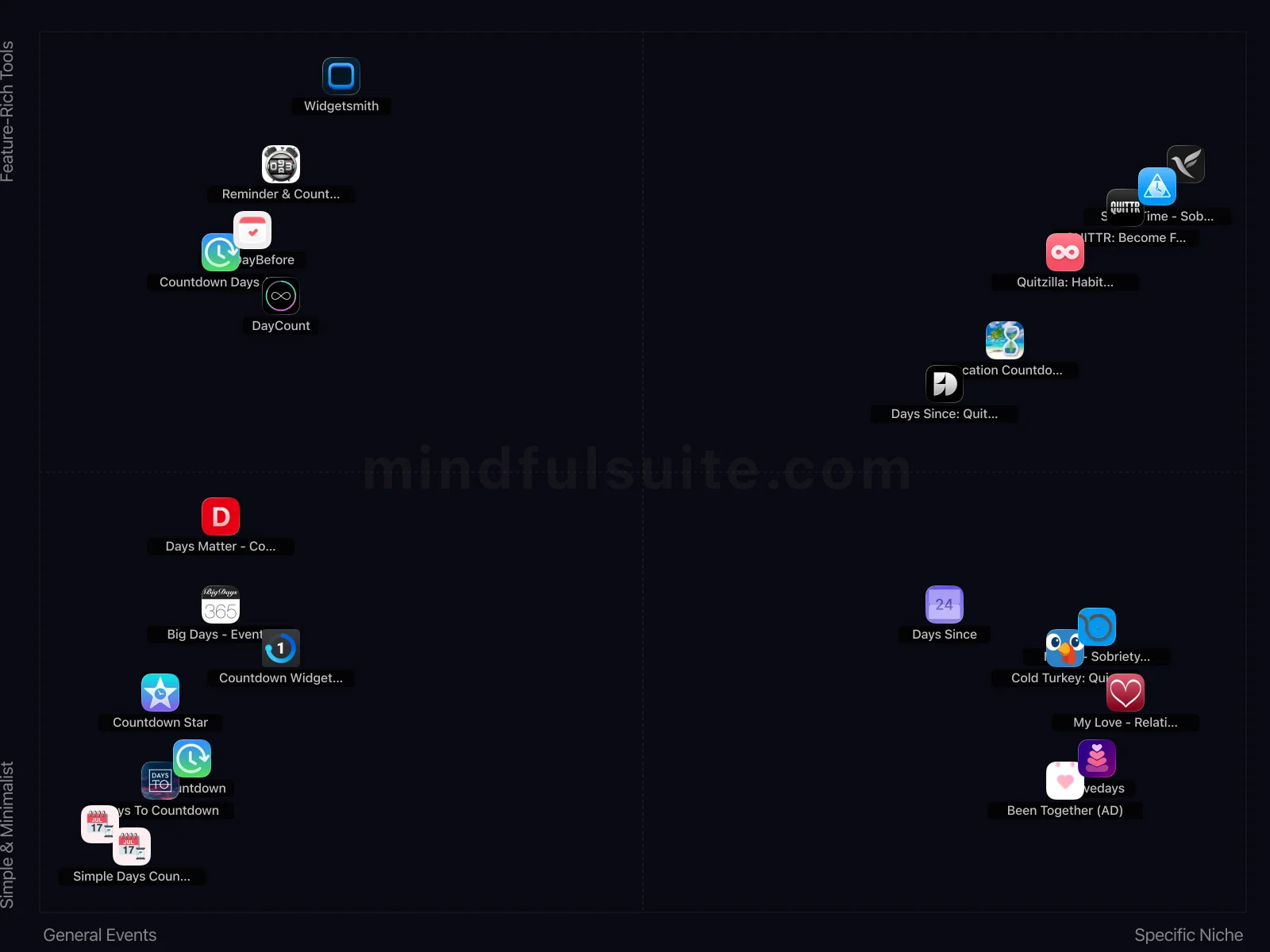
These 23 apps don't all solve the same problem. They cluster into 4 distinct groups, each built around a different philosophy. Understanding which group fits you is the fastest way to narrow your search.
General Events + Feature-Rich Tools
5 apps in this group, led by  Reminder & Countdown,
  TheDayBefore, and
  Widgetsmith.
What defines this cluster: event reminders, birthday reminders, meeting reminders, holiday reminders.
Widgetsmith.
What defines this cluster: event reminders, birthday reminders, meeting reminders, holiday reminders.
Specific Niche + Feature-Rich Tools
6 apps in this group, led by  Days Since: Quit Habit Tracker,
  QUITTR: Become Free, and
  Quitzilla: Habit Breaker.
What defines this cluster: break bad habits, track sober time, clean day counter, free with iap.
Quitzilla: Habit Breaker.
What defines this cluster: break bad habits, track sober time, clean day counter, free with iap.
General Events + Simple & Minimalist
6 apps in this group, led by  Days To Countdown,
  Countdown Star, and
  Countdown.
What defines this cluster: free with iap, countdown timer, countdown to special days, home screen widgets.
Countdown.
What defines this cluster: free with iap, countdown timer, countdown to special days, home screen widgets.
Specific Niche + Simple & Minimalist
6 apps in this group, led by  My Love - Relationship Counter,
  Nomo - Sobriety Clocks, and
  Cold Turkey: Quit for Good.
What defines this cluster: relationship counter, free with iap, sobriety clocks, track sobriety progress.
Cold Turkey: Quit for Good.
What defines this cluster: relationship counter, free with iap, sobriety clocks, track sobriety progress.
What makes them different
The core tension in this category runs along two axes. On one side, General Events apps prioritize simplicity and speed — you can be up and running in under a minute. On the other, Specific Niche apps offer depth and customization that rewards investment over time.
The second axis — Functionality — captures an equally important difference. Apps closer to Simple & Minimalist take a fundamentally different approach than those near Feature-Rich Tools. Neither is objectively better. The right choice depends on your personality, your experience level, and what you're trying to accomplish.
24 Apps Reviewed
We scored every app using a weighted composite of real App Store and Google Play ratings. Out of 24 apps: 13 Essential · 4 Hidden Gems · 2 Mainstream · 1 Popular. 12 cross-platform, 8 iOS-only, 2 Android-only.
Top picks: TheDayBefore and Days To Countdown scored highest overall. Countdown Star rounds out the top three. Switch to the Apps tab for the full list with ratings and download links.
How to Pick the Right One
Look at the cluster section above. If you already know whether you want General Events or Specific Niche, that eliminates half the options instantly. Same for Simple & Minimalist vs Feature-Rich Tools.
Try one app for a full week before judging. Most day counter apps reveal their value around day 5, not day 1.
Quick start: TheDayBefore and Days To Countdown represent two different approaches and both scored highest. Pick whichever resonates, switch if it doesn't click.
Making It Stick: Practical Advice
Downloading the app is the easy part. The hard part — the part that actually produces results — is what happens in weeks two, three, and beyond. These tips are drawn from behavioral research and from patterns we've observed across hundreds of thousands of user reviews. They're not revolutionary, but they work:
Put your most important counter on a widget
The counter you see most often is the one that impacts your behavior most. A home screen widget means you see it every time you unlock your phone.
Don't catastrophize a reset
If your counter resets (especially for sobriety or habit-breaking), the days you accumulated weren't wasted. Each day counted still represented real progress. Start again immediately.
Frequently Asked Questions
These are the questions that come up most often — from our own testing, from user reviews, and from the broader conversation around day counter apps. If your question isn't here, the Apps tab has detailed information on every app we reviewed.
Are day counter apps useful for sobriety?
Yes. Many people in recovery find day counting powerfully motivating. The growing number represents a tangible investment in sobriety, and reaching milestones provides regular moments of pride. Look for apps with privacy features and milestone celebrations.
Can I track multiple events at once?
Most day counter apps support multiple simultaneous counters. You might track days sober, days exercising consistently, days until a vacation, and your relationship anniversary all in the same app.
The Best Day Counter Apps (2026)
Remember circling dates on a paper calendar with a red Sharpie? There was something incredibly satisfying about crossing off the days until a big trip, a birthday, or a massive deadline. But dates floating around in your head are slippery things—easy to forget and hard to visualize when you're caught up in a busy week.
That's where a great day counter app comes in. It transforms abstract numbers on a grid into a tangible, exciting countdown you can watch with anticipation. It's the modern version of that red Sharpie, complete with beautiful home screen widgets, personal photos, and friendly nudges to keep you motivated. Whether you're tracking a new habit streak or counting down the hours to your next vacation, these are the best tools to help you do it.
Top General Day Counters & Widgets
These apps are the multi-tools of the countdown world. They let you track everything from your sister's wedding to your next dental appointment, usually with beautiful, highly customizable widgets for your home screen.

Awareness
A time visualization app that helps you beat time blindness with 25+ unique ways to see time passing across iOS, Apple Watch, and Mac.
- 25+ unique ways to visualize time passing (hours, days, weeks, months, years, life).
- Excellent Apple Watch integration and haptic reminders.
- Mac app provides detailed analytics.

TheDayBefore
Meet the crowd-pleaser. TheDayBefore is a superstar on both iOS and Android, designed to help you beautifully manage every important date in your life—from anniversaries and exams to birthdays and holidays. Its library of gorgeous widgets is a huge plus.
- The wide variety of stylish widgets allows extensive home screen personalization and decoration.
- Its focus on managing diverse event types like anniversaries and exams makes it truly versatile.

Big Days - Events Countdown
Big Days is all about making your countdowns beautiful. It’s a clean, stylish app for both iOS and Android that lets you track time both *towards* and *since* an event. Its best feature is the ability to use your own photos as a background, making each countdown feel personal and vibrant.
- Customizing events with your own photos makes each countdown genuinely personal and visually appealing.
- Its lightweight design ensures smooth performance without draining battery, a plus for everyday use.

Days To Countdown
This one is a bit of a mystery. It promises simple countdowns, widgets, and notifications, but there's very little information available about its performance or user satisfaction. It might be a simple, no-frills tool, but it's a bit of a gamble.
- Its straightforward simplicity makes setting up new countdowns incredibly quick and fuss-free.
- Customizable notifications are genuinely helpful for ensuring you never miss an important milestone.

DayCount
For the data-lover who wants to track time down to the second, DayCount positions itself as a serious productivity tool. It gives you incredible control, letting you see your countdowns in years, months, days, hours, minutes, and even seconds.
- The "count since" feature is excellent for tracking important anniversaries or milestones from the past.
- Its minimalist design focuses purely on numerical tracking without unnecessary visual clutter.

Reminder & Countdown
Why use two apps when one will do? This iOS tool cleverly merges a countdown timer with a full-fledged reminder and to-do list. It’s built for those who want an all-in-one solution for tracking meetings, tasks, and important life events.
- Its comprehensive event categories cover everything from birthdays to dentist appointments, making it genuinely versatile.
- The app excels as a general-purpose reminder tool, distinguishing it from single-focus countdowns.

Countdown Star
A direct competitor to TheDayBefore, Countdown Star is another fan-favorite that shines with personalization. It lets you count both down to and up from events, and setting a unique wallpaper for each one makes your countdowns feel special and engaging.
- The ability to customize each event with unique wallpapers or photos is a fantastic personal touch.
- It's completely free, offering premium features like customization without any paywalls.

Simple Days Counter
Simple Days Counter is a basic tool, its function is not specified in the description.

Widgetsmith
The undisputed king of customization, [Widgetsmith](https://apps.apple.com/us/app/widgetsmith/id1523682319) gives you the creative freedom to build widgets from the ground up. You can design widgets for weather, calendars, photos, astronomy, and more, each with granular control over fonts, colors, and layouts.
- Offers unparalleled customization for personalizing widgets with photos, fonts, and unique color schemes.
- Its smart scheduling feature allows widgets to change dynamically throughout the day, which is genuinely clever.


Countdown Days App & Widget
With over 10 million downloads, this app is a heavyweight in the Android countdown space. It focuses on giving you a precise, down-to-the-minute look at your upcoming events, complete with a handy home screen widget.
- The granular countdown to days, hours, and minutes is perfect for critical, time-sensitive events.
- Its calendar view offers a comprehensive overview of all upcoming milestones, which is genuinely useful.
Simple Days Counter
Simple Days Counter tracks events and milestones with customizable reminders, counting up or down to dates.
Best for Couples & Anniversaries
Want to remember exactly how many days you've been with your partner? These dedicated relationship counters are designed specifically to celebrate your milestones together, minus the clutter of your work deadlines.

Lovedays
Similar to Been Together, Lovedays is a D-Day counter for couples. It helps you keep track of anniversaries and other important dates with a visually appealing and customizable interface.
- The customizable D-Day counter and intuitive widgets make tracking anniversaries incredibly convenient.
- Its clean interface specifically focuses on commemorating important dates, keeping things simple and clear.

Been Together (AD)
It is a simple D-day counter app for couples. This app tracks and displays the number of days a couple has been together with a customizable display.

My Love - Relationship Counter
It simply counts the days you and your partner have been together, displaying the relationship length.
- Its singular focus on relationship duration makes it perfectly tailored for couples tracking their time together.
- The dedicated interface and features are much more intimate than a generic countdown app.
Best for Tracking Habits & Streaks
Building a new routine—or breaking a tough one—is a marathon. These apps focus on tracking the days since an event, turning your sobriety or habit-building journey into a highly motivating daily streak you won't want to break.

Sober Time - Sobriety Counter
This app tracks sobriety and provides motivation for addiction recovery. It's for individuals seeking support and community as they work towards overcoming addiction.
- Specifically designed for addiction recovery, offering tailored tools like a sobriety counter and community support.
- Provides a dedicated platform for tracking various addictions, which generic habit trackers often lack.

Days Since: Quit Habit Tracker
Days Since is a habit tracker that helps users break bad habits by counting sober days. It's for anyone trying to quit smoking or overcome other addictions.
- Versatile habit tracker that can be adapted to "break any bad habit," offering broad utility.
- The "Sober Time Clean Day Counter" tagline highlights its strong focus on streak-based motivation.

Quitzilla: Habit Breaker
Most apps focus on building good habits, but Quitzilla is your ally in breaking bad ones. Designed specifically to help you overcome addictions, it tracks your sober time down to the second. Whether it's smoking, drinking, or excessive screen time, the app provides powerful motivation by calculating the money and time you've saved since you quit.
- Its dedicated focus on breaking bad habits, with features like "money saved" and "sober time," is incredibly effective for specific goals.
- The milestone achievements and personalized motivation messages provide strong encouragement during difficult times.

Nomo - Sobriety Clocks
Created by a person in recovery, this helps track and maintain sobriety with personalized clocks.

Days Since
Days Since tracks elapsed time since events, creating reminders and widgets to monitor habits or important dates. It's useful for forming new habits or remembering recurring events like appointments.

Cold Turkey: Quit for Good
A recovery app to help users break free from addictions such as porn, fast food, gambling, and alcohol.
Best for Vacations and Trips
Nothing beats the feeling of knowing exactly how many hours are left until your out-of-office message goes live. These travel-focused counters add an extra layer of hype to your upcoming getaways.

Vacation Countdown App
This app counts down the days, hours, and minutes until a vacation begins. The Vacation Countdown App includes games and more to pass the time.
- The included mini-games offer a unique, engaging distraction while waiting for your trip.
- Specific vacation-themed backgrounds and destination input make the countdown feel more personal and exciting.
Whether you're eagerly awaiting a flight to Bali, celebrating another year with your favorite person, or simply trying to string together a five-day gym streak, the right day counter makes all the difference. Add a few widgets to your home screen and start giving those important dates the attention they deserve!