
Minimal Productivity Apps: What You Need to Know in 2026
Your productivity app has 47 features, 12 view modes, and requires a tutorial video to set up. Meanwhile, your actual tasks aren't getting done. There's a quiet counter-revolution in productivity tools: apps that do less, beautifully. No feature bloat, no learning curve, no settings rabbit holes — just the essential tools you need to capture tasks and do them.
We evaluated 13 minimal productivity apps across iOS and Android, scoring each on real user ratings, feature depth, and long-term value. This guide covers what we found.
The Productivity Tool Trap: When Your System Becomes the Work
There is a specific pathology that afflicts conscientious, organized people — the ones most likely to seek out productivity tools in the first place. It goes like this: you discover a powerful task manager. You spend an evening setting up projects, tags, contexts, and filters. You watch tutorial videos. You configure automations. You integrate it with your calendar, your email, your note-taking app. You design a weekly review template. You feel productive. You have not yet completed a single task.
This is the productivity tool trap, and it is more common than anyone admits. The system becomes the work. The maintenance overhead — processing inboxes, reorganizing projects, updating tags, tweaking filters, troubleshooting sync issues — gradually consumes the time the system was supposed to save. Some people spend their Sunday evenings "setting up the week" in a tool that exists to save them time during the week. The irony does not register because the setup feels productive. It has all the satisfying qualities of real work — organization, decision-making, visible progress — without actually moving any meaningful project forward.
Minimal productivity apps sidestep this trap entirely through the elegant strategy of having nothing to configure. There are no tags because there is no tagging system. There are no filters because there is nothing to filter. There are no integrations because the app does not connect to anything. There is a list. You add things to it. You check things off. That is the entire interaction surface.
The people who benefit most from minimal tools are often the ones who have tried — and failed with — complex systems. Not because they lacked the ability to use them, but because their thoroughness became the problem. They configured too well, maintained too diligently, and optimized the system at the expense of the work the system was supposed to support.
If you recognize yourself in this description, the prescription is not better self-discipline with a complex tool. It is a simpler tool that removes the temptation entirely.
The Minimum Viable Feature Set: What You Actually Need
Strip a productivity app down to its absolute essentials and you get a surprisingly short list. A task entry mechanism — one that is fast enough that you will actually use it in the moment, not "later when I have time." If adding a task takes more than five seconds, you will start holding tasks in your head again, which defeats the entire purpose. A view of today's tasks — clear, uncluttered, showing you what needs your attention without requiring you to navigate, filter, or scroll. And a way to mark things done — ideally with some small tactile or visual satisfaction, because completion should feel like something.
That is the core. Everything else is optional.
Due dates are the first useful addition. They transform a static list into a time-aware system that can remind you before deadlines arrive. But even due dates are optional for people whose work does not involve hard deadlines — some people operate effectively on a pure priority system without dates.
After due dates, the features diverge into genuinely useful for some people and pure overhead for others. Projects help if you manage multiple distinct workstreams. Subtasks help if your work involves multi-step processes. Recurring tasks help if you have regular obligations. Collaboration features help if you share tasks with others. Each of these is defensible for a specific use case and unnecessary baggage for everyone else.
The minimal productivity philosophy says: start with the smallest possible feature set. Use it for two weeks. Notice what you actually miss — not what you theoretically might need, but what limitation you concretely hit. Add that one thing. Repeat. Most people who follow this process discover they need far less than they assumed.
The apps that embody this approach do not apologize for their simplicity. They do not hide a complex feature set behind a simple interface. They are simple, full stop. The list is short. The interaction is fast. The cognitive overhead is near zero. For a surprising number of people, that is not a limitation. It is the entire point.
The Philosophical Case for Doing Less, Better
Greg McKeown opens his book Essentialism with a diagram. On the left: energy dispersed in many directions, each arrow small and ineffective. On the right: the same total energy concentrated in one direction, the single arrow long and powerful. The visual is almost too simple, but the principle it illustrates is genuinely transformative for people willing to internalize it.
The essentialist argument is not about laziness or doing less for its own sake. It is about the disciplined pursuit of less — the recognition that in a world of infinite inputs, infinite opportunities, and infinite demands on your attention, the competitive advantage belongs not to the person who does the most things but to the person who does the right things with full commitment.
Minimal productivity apps are the tooling expression of this philosophy. A complex task manager with 200 tasks across 15 projects implicitly tells you that all 200 tasks matter and you should feel bad about the 190 you did not complete today. A minimal app with space for three to five items asks a fundamentally different question: what are the few things that would make today genuinely successful? The constraint is the feature. The inability to list 50 tasks forces you to choose, and choosing is the essential act that most productivity systems let you avoid.
There is a deeper point here about the relationship between tools and thinking. Complex tools encourage complex thinking — more categories, more distinctions, more organizational structure. Simple tools encourage clear thinking — what matters, what does not, what am I going to do right now. Neither approach is universally superior, but most people err toward complexity because it feels more thorough, more responsible, more professional. The result is an elaborate system that tracks everything and prioritizes nothing.
The philosophical case for minimal productivity is ultimately a case for honesty. You cannot do 50 things well. You can do three things well. A tool that acknowledges this — that is designed around human limitations rather than pretending they do not exist — is not a lesser tool. It is a more honest one.
4 Types of Minimal Productivity Apps — and How They Differ
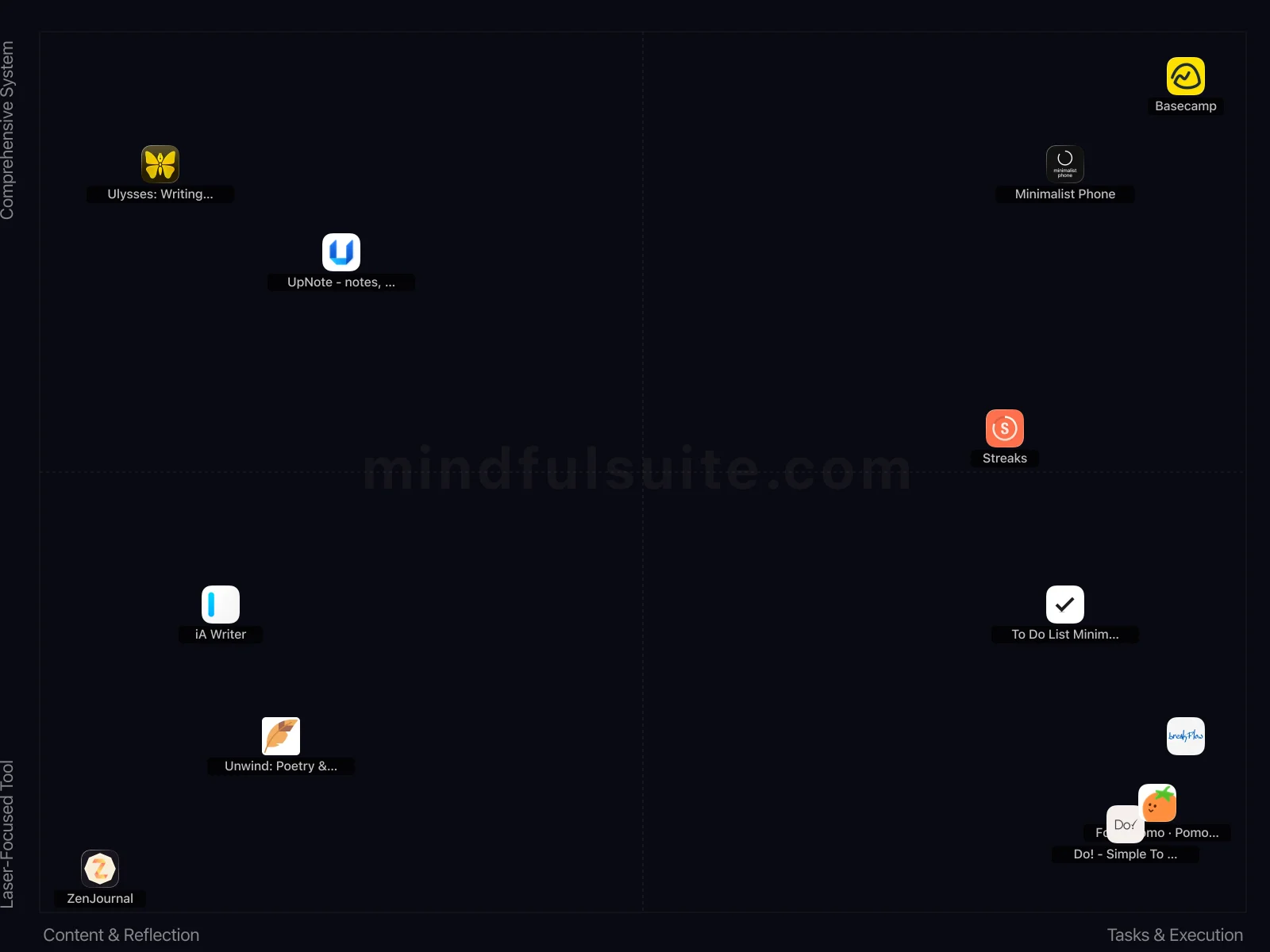
These 12 apps don't all solve the same problem. They cluster into 4 distinct groups, each built around a different philosophy. Understanding which group fits you is the fastest way to narrow your search.
Content & Reflection + Comprehensive System
2 apps in this group, led by  Ulysses: Writing App and
  UpNote - notes, diary, journal.
What defines this cluster: writing environment, document management, seamless sync, flexible export.
UpNote - notes, diary, journal.
What defines this cluster: writing environment, document management, seamless sync, flexible export.
Tasks & Execution + Comprehensive System
3 apps in this group, led by  Basecamp,
  Minimalist Phone, and
  Streaks.
What defines this cluster: project management, team communication, organizes projects, organizes tasks.
Streaks.
What defines this cluster: project management, team communication, organizes projects, organizes tasks.
Content & Reflection + Laser-Focused Tool
3 apps in this group, led by  iA Writer,
  Unwind: Poetry & Writing, and
  ZenJournal.
What defines this cluster: focused writing environment, daily journaling support, note-taking functionality, free.
ZenJournal.
What defines this cluster: focused writing environment, daily journaling support, note-taking functionality, free.
Tasks & Execution + Laser-Focused Tool
4 apps in this group, led by  Do! - Simple To Do List,
  To Do List MinimaList & Widget, and
  FocusPomo · Pomodoro Timer.
What defines this cluster: simple to-do list, free (iap), free with in-app purchases, planner, reminder, and tasks.
FocusPomo · Pomodoro Timer.
What defines this cluster: simple to-do list, free (iap), free with in-app purchases, planner, reminder, and tasks.
What makes them different
The core tension in this category runs along two axes. On one side, Content & Reflection apps prioritize simplicity and speed — you can be up and running in under a minute. On the other, Tasks & Execution apps offer depth and customization that rewards investment over time.
The second axis — Scope of Application — captures an equally important difference. Apps closer to Laser-Focused Tool take a fundamentally different approach than those near Comprehensive System. Neither is objectively better. The right choice depends on your personality, your experience level, and what you're trying to accomplish.
13 Apps Reviewed
We scored every app using a weighted composite of real App Store and Google Play ratings. Out of 13 apps: 4 Essential · 7 Hidden Gems. 6 cross-platform, 4 iOS-only, 3 Android-only.
Top picks: Minimalist Phone and Do! - Simple To Do List scored highest overall. Basecamp rounds out the top three. Switch to the Apps tab for the full list with ratings and download links.
How to Pick the Right One
Look at the cluster section above. If you already know whether you want Content & Reflection or Tasks & Execution, that eliminates half the options instantly. Same for Laser-Focused Tool vs Comprehensive System.
Try one app for a full week before judging. Most minimal productivity apps reveal their value around day 5, not day 1.
Quick start: Minimalist Phone and Do! - Simple To Do List represent two different approaches and both scored highest. Pick whichever resonates, switch if it doesn't click.
Making It Stick: Practical Advice
Downloading the app is the easy part. The hard part — the part that actually produces results — is what happens in weeks two, three, and beyond. These tips are drawn from behavioral research and from patterns we've observed across hundreds of thousands of user reviews. They're not revolutionary, but they work:
Resist adding complexity
If you chose a minimal app, trust that choice. Don't try to recreate a complex system within a simple tool. The simplicity IS the value.
Use it for daily tasks only
Keep long-term projects and reference material elsewhere. Your minimal productivity app should show you only what needs your attention today.
Frequently Asked Questions
These are the questions that come up most often — from our own testing, from user reviews, and from the broader conversation around minimal productivity apps. If your question isn't here, the Apps tab has detailed information on every app we reviewed.
Won't I need more features eventually?
Maybe, maybe not. Many people who switch to minimal productivity apps discover they were over-engineering their task management. If you genuinely need more features, you'll know. Don't add complexity preemptively.
How is this different from the built-in notes app?
Even minimal productivity apps offer features the default notes app lacks: checkboxes, due dates, reminders, and sync. They're minimal compared to complex project management tools, not compared to plain text.
The Best Minimal Productivity Apps for 2026
We've all fallen into the productivity trap. You decide it's time to get your life organized, so you download a highly recommended app. Three hours later, you're deep in a rabbit hole of color-coded tags, nested sub-folders, and automated Kanban boards that look like the dashboard of a space shuttle. Instead of doing your actual work, you've just given yourself a second job: managing your productivity system.
There is a profound relief in stepping away from feature bloat. When your mind is already racing, a complex app only adds to the cognitive load. You don't always need a Swiss Army knife with thirty-two attachments; sometimes, you just need a really good, sharp blade.
Minimal productivity apps operate on a radically different philosophy. They strip away the endless toolbars, ditch the complex collaboration features, and present you with a blank, quiet space. They force you to focus on the task at hand, rather than the tool you're using to track it. If you're ready to trade digital overwhelm for elegant simplicity, here are the best minimal tools to quiet the noise.
Calming Your Phone's Chaos
Your smartphone is essentially an infinite slot machine designed to capture your attention. Before you can be productive, you have to stop the mindless scrolling. These tools act as digital blinders, transforming your flashy device into a calm, intentional tool for getting things done.

Priorities
A simple to-do list app employing a method used by investors, it helps users prioritize tasks.

Minimalist Phone
Replaces your default home screen with a minimalist, distraction-free interface to reduce phone usage. It's for users wanting to cultivate mindful phone habits.
- Its stark, grayscale interface and limited app access fundamentally reframe phone interaction, effectively curbing mindless scrolling.
- The built-in app usage limits and notification filtering are powerful tools for actively reducing digital distractions and promoting focus.

FocusPomo · Pomodoro Timer
A minimalist Pomodoro timer designed to help users stay focused and productive while working or studying.
- Its "minimalist, beautiful" design provides a clean, professional interface for distraction-free Pomodoro sessions.
- The high 4.8★ iOS rating suggests a polished and highly satisfying experience for Apple users.

Breakflow: Focus booster
Breakflow combines the Pomodoro technique with minimalist visual animations to boost focus. It uses visual cues to represent time passing during work and rest cycles.
Stripped-Back Task & Habit Trackers
The irony of most to-do lists is that they make you feel incredibly stressed about everything you haven't done yet. These apps take a gentler approach. They mimic the satisfying, low-pressure feeling of scribbling on a post-it note, letting you capture what matters without demanding you assign a priority matrix to picking up dry cleaning.

To Do List MinimaList & Widget
A simple to-do list and task manager app with a clean interface and widget support. This is a basic and minimalist approach to productivity.
- Minimalist design truly reduces visual clutter, making task management less overwhelming for distracted minds.
- Intuitive widget functionality provides quick glances at priorities without needing to open the full application.

Do! - Simple To Do List
This is a basic to-do list application.
- Delivers on its promise of extreme simplicity, making task creation and management incredibly fast and direct.
- Its minimalist design avoids feature bloat, offering a refreshing alternative to complex productivity suites.

Streaks
A minimalist habit tracker that emphasizes privacy with a customizable interface and home screen widget.
Blank Canvas Writing & Note-Taking
Whether you are trying to capture a fleeting thought, journal about your day, or draft a long-form essay, formatting is the enemy of flow. These writing environments remove the ribbons, fonts, and heavy toolbars. They leave you with nothing but your words and a cursor, practically daring you to just start typing.

ZenJournal
Sometimes, the most important thing is just to get the thought out of your head and onto the page. ZenJournal is built for exactly that. It's a minimalist, lightning-fast journaling app perfect for scripting exercises or quick "brain dumps." Its beautiful simplicity removes all friction, letting you focus purely on the energy of your words.
- Its extremely minimalist interface prioritizes quick, distraction-free logging of thoughts and affirmations, ideal for micro-journaling.
- The focus on simplicity makes it incredibly lightweight and fast, perfect for capturing fleeting manifestation insights.

UpNote - notes, diary, journal
UpNote is a clean and simple app for writing and organizing notes, diaries, and journals. It is easy to use with rich features and a delightful experience.
- Its versatile design allows seamless integration of general notes and daily journaling within one organized system.
- The rich markdown support provides extensive formatting options for detailed entries and lists.

iA Writer
Provides a distraction-free writing environment for journaling and note-taking. Offers a clean interface to help focus on writing.
- Its signature Focus Mode truly eliminates distractions, perfect for uninterrupted daily reflection;
- The clean, minimalist interface prioritizes writing content above all else, fostering clarity.

Ulysses: Writing App
This writing environment for Mac, iPhone, and iPad offers focused writing, document management, syncing, and flexible export. Ulysses is designed for writers of all kinds.
- Its Markdown-first approach and extensive export options are unparalleled for serious long-form writing projects.
- Seamless cross-device synchronization and robust document management make it ideal for multi-platform authors.

Unwind: Poetry & Writing
This distraction-free writing app provides a peaceful environment for poetry, journaling, and stories. Unwind allows emotional expression.
Teamwork Without the Clutter
Collaborating with others usually means drowning in notification pings, messy chat threads, and overly complex project management software. If you're working with a small team and want to keep everyone on the same page without requiring a training seminar, this tool brings a breath of fresh air to group work.

Basecamp
Basecamp is a project management and team communication tool that organizes projects, tasks, and discussions. It's useful for teams seeking to centralize communication and streamline project workflows.
- The "Hey" and "Campfire" communication tools effectively centralize team discussions and notifications within projects.
- Its unique "To-dos," "Message Board," and "Docs & Files" features offer a distinct approach to project organization.
Finding Your Perfect Fit
Transitioning to minimal productivity apps requires a bit of an ego check. You have to accept that you don't actually need a dozen integrations and granular data analytics to have a successful day.
If your phone screen time is your biggest hurdle, start by rethinking your home screen. If your brain feels full of unorganized thoughts, grab a blank-canvas text editor and just start doing daily brain dumps. The goal isn't to build a perfect, watertight system. The goal is simply to clear the path, reduce the friction, and give yourself the mental space to do your best work. Pick one simple tool, let go of the rest, and enjoy the quiet.